Invoicing & quotations
Tax invoices, quotations, proforma, delivery challans and purchase orders. Convert a quote to an invoice without retyping a line.
Invoicing, inventory, and accounts for GCC businesses. Your books live on your own device, so the counter never stops — and sync catches everything up the moment you are back online.
Loads a full sample business in your browser. No signup, no card, nothing to install.
100%
Offline-capable — every screen, not just the POS
Phase 2
ZATCA e-invoicing, QR and signed XML included
90 days
Free trial on the top plan, no card required
3 apps
Web, Windows desktop and Android, one account
BillGPT is free billing, accounting and inventory software for small and medium businesses in Saudi Arabia, the wider GCC and India. It handles tax invoices, quotations, purchases, stock, expenses and party ledgers in one place, with ZATCA Phase 2 e-invoicing for the Gulf and GST for India built in rather than sold as add-ons. Unlike browser-only accounting tools, it keeps a real database on your own device, so billing, stock and printing keep working with no internet at all, and sync to your other devices when the connection returns.
Everything in one place
Sales, purchases, stock, cash and compliance share the same ledger — so a number you change in one place is already right everywhere else.
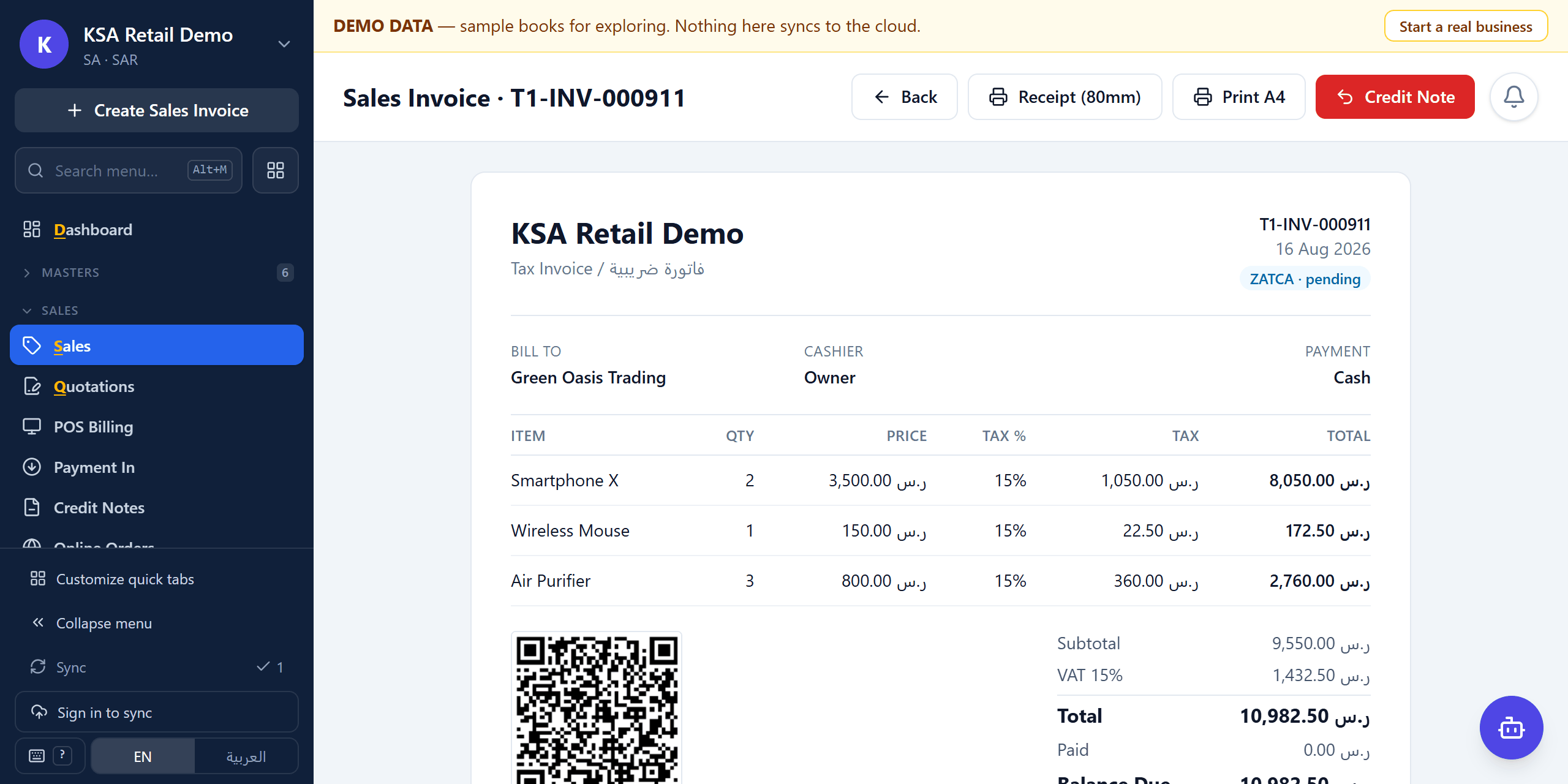
Tax invoices, quotations, proforma, delivery challans and purchase orders. Convert a quote to an invoice without retyping a line.
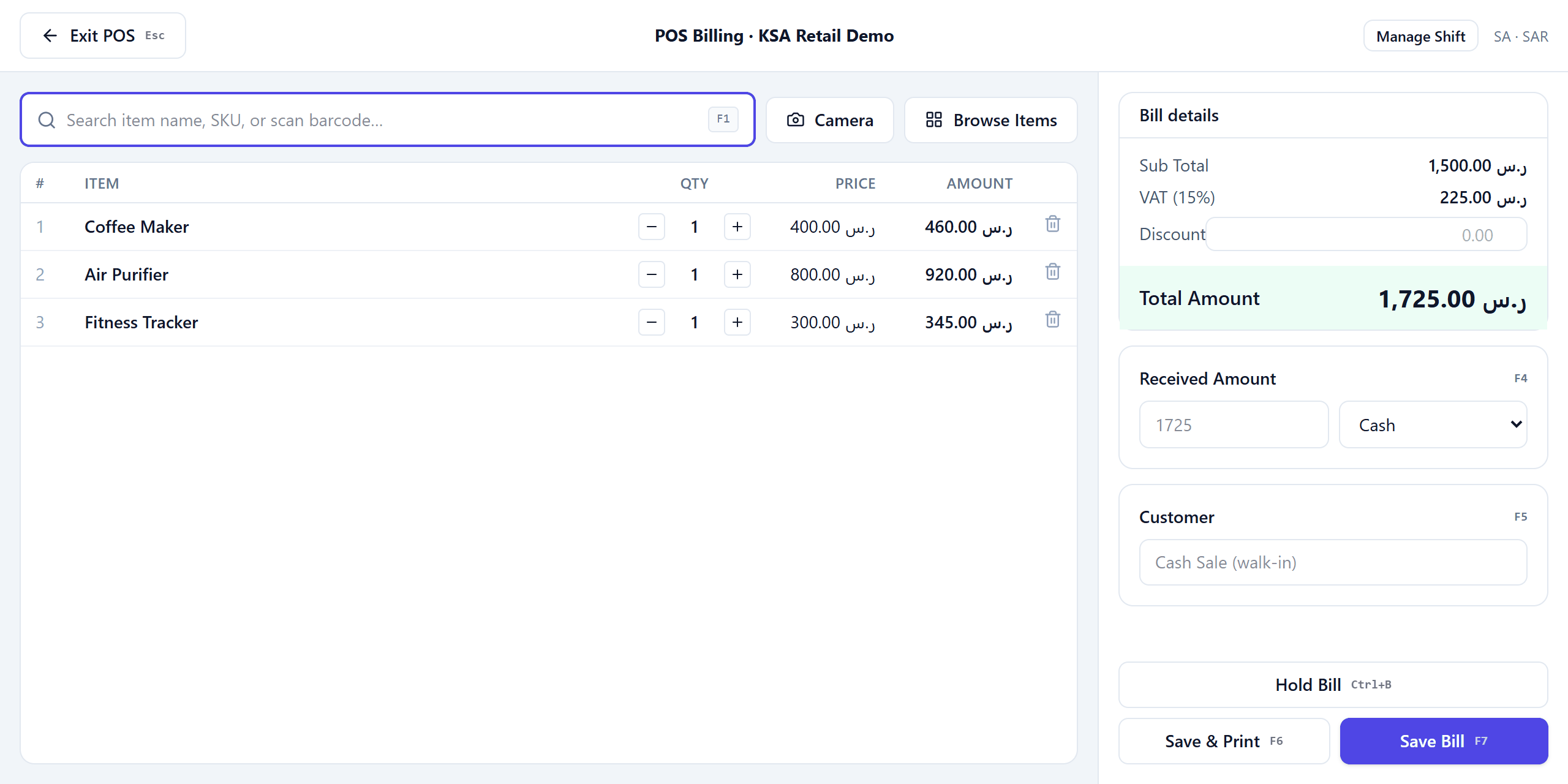
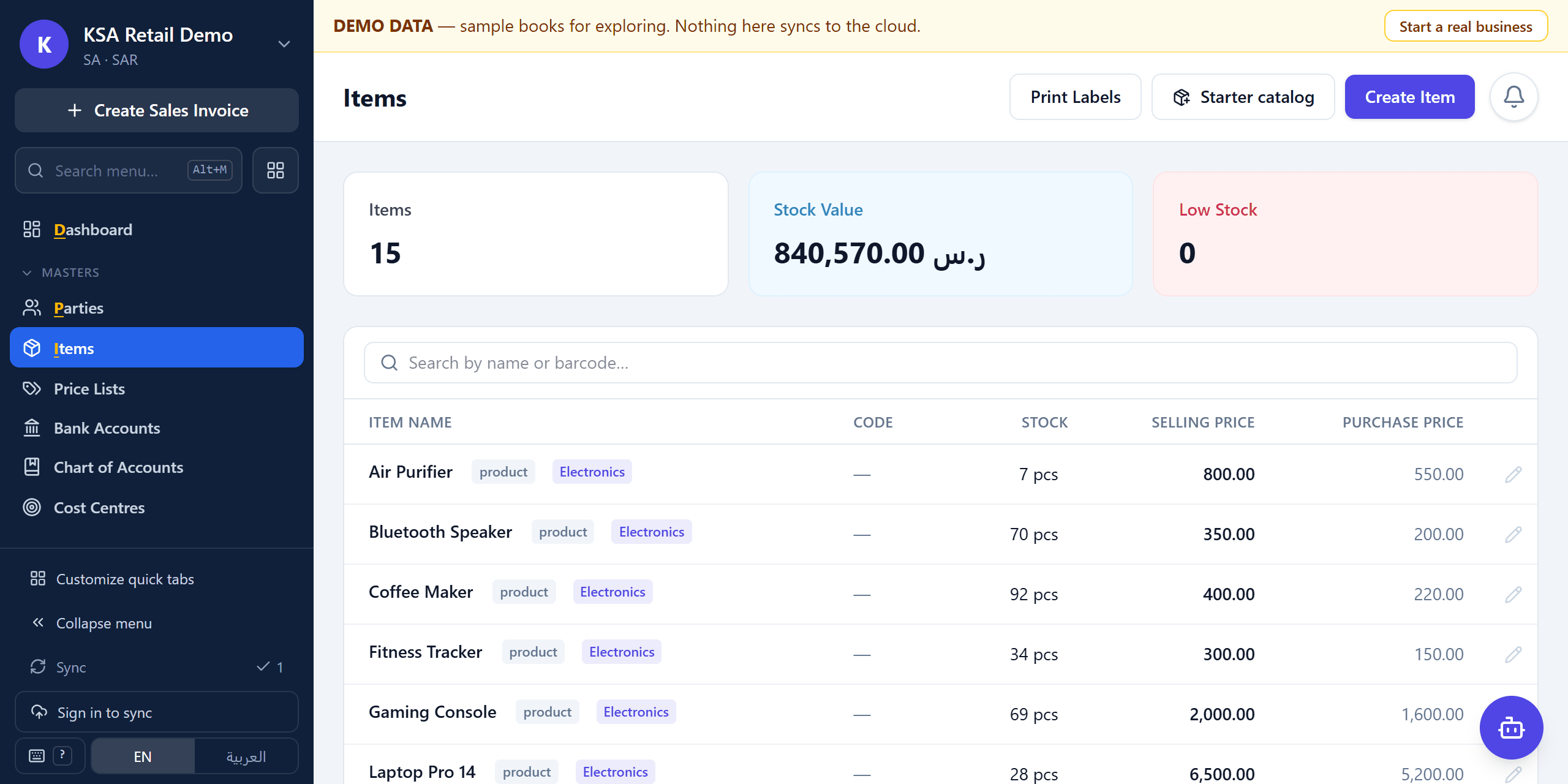
Stock moves with every sale, purchase and return. Scan with the camera, print your own shelf labels, and see what is actually on the rack.
Payments, expenses and party statements on one ledger, so you can answer “who owes me what” without opening a second file.
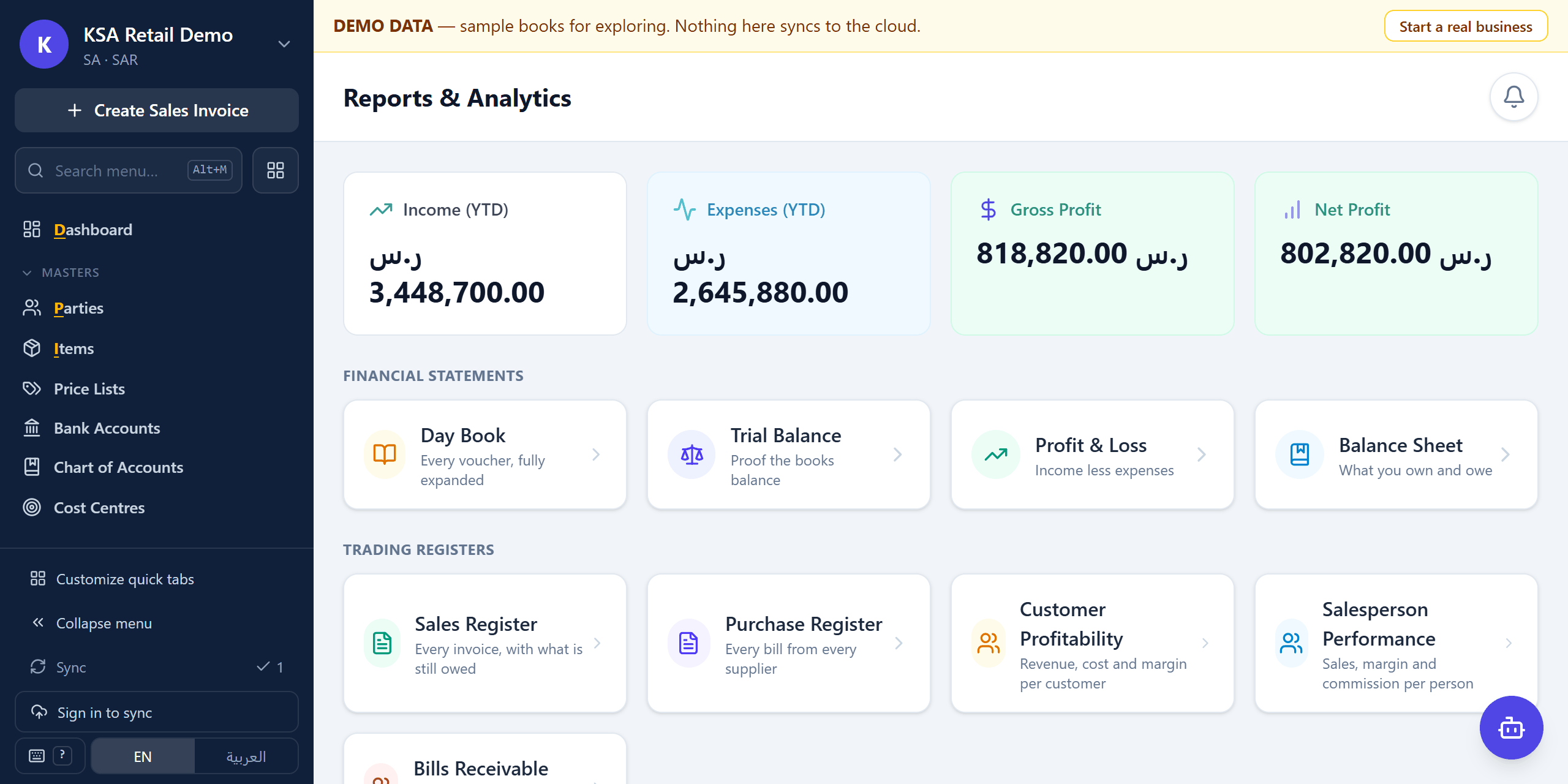
Sales, tax, stock and receivables built from the same voucher entries the invoices came from — not a parallel set of numbers.
Drop a supplier bill in as a PDF or a photo and let it fill in the purchase entry. Bring your own AI key, or use the credits included in your plan.
Give the counter staff exactly the screens they need. Run several companies from one login, each with its own books.
Tax & compliance
Tax is part of the ledger, not a report you assemble afterwards. Pick your country at setup and the right rates, returns and invoice layouts are already in place.
Switch the country to India and the engine changes with it — the same 18% charge splits into CGST and SGST within a state, or becomes IGST across one.
Tax Invoice
فاتورة ضريبية
TLV QR code
Seller, VAT number, timestamp, total and VAT — encoded exactly as ZATCA specifies.
Offline-first
BillGPT keeps a real database on the machine in front of you, not a cache of a web page. Every screen works with the cable unplugged — creating invoices, taking payments, moving stock, printing.
When the connection comes back, changes sync to your other devices as an append-only log. Two people billing at once end up with one consistent set of books, not a conflict you have to untangle by hand.
See it in the demoProduct tour
Or skip the pictures and open the demo — it is the same build, loaded with a sample business.
Who uses it
Barcode scanning, a fast till, shelf labels and stock that stays honest across returns and damages.
Menu-driven billing, table and takeaway orders, and kitchen-side item management.
Price lists per customer, purchase orders, credit tracking and party statements that settle arguments.
Quotations, proforma invoices, running account bills and job-wise costing.
A free tier and a one-click demo company make it a real double-entry system to learn on — vouchers, ledgers, trial balance and final accounts, without a licence or a lab install.
Run several client companies from one login, each with separate books and its own users.
AI, where it earns its place
The AI in BillGPT is aimed at data entry and questions, not at deciding your accounts. Every action it takes is bounded by the same permissions your staff have, and you can read exactly what it did.
Drop in a PDF or a photograph of a bill and the purchase entry fills itself in, lines and taxes included, for you to check before it posts.
“Which customers owe me more than 30 days?” answered from your own data, on your own device.
Automations run against your books under explicit, per-skill permissions, with an audit log of every write. Reading is always allowed; writing never is by default.
Bring your own API key and pay the vendor directly, or use the credits included in your plan. Nothing is sent anywhere on the free tier unless you turn it on.
Switching
We are not affiliated with any of them, and we will not pretend a migration is one click. Here is what each move actually looks like.
All product names are trademarks of their respective owners, used here only to describe migration paths.
Listed separately from everything above because none of it has shipped yet. We would rather lose a sale than have you buy a promise.
Leads, follow-ups and quotation pipelines, sharing the party ledger the invoices already use.
Staff records, attendance, leave and payroll posting straight into the accounts.
Want either of these? Tell us on the form — what customers ask for first is what gets built first.
Pricing
Every new account starts on the top plan for 90 days. No card, and nothing is deleted if you decide not to pay — you drop to the free tier and keep your books.
One shop, one device, the essentials.
Free
forever
Get startedFor a growing shop with staff and a second till.
₹499 /month
billed monthly
Start 90-day trialSeveral branches, unlimited staff, everything on.
₹1,499 /month
billed monthly
Talk to usPrices exclude tax. Need a different currency or an on-premise deployment? Ask us.
Both, and they are different things. The Community plan is free forever — invoicing, parties, items, stock and expenses, on one device, with no time limit and no card. Separately, every new account gets 90 days on the top plan to try the paid features. When those 90 days end you drop to Community rather than losing anything.
One device, one user, one company, and no cloud sync, online storefront or ZATCA clearance. Those are the things that cost us money to run. Everything you enter stays yours and stays exportable.
No. The database sits on your device, so billing, stock and printing all work offline. You only need a connection to sync between devices, to reach the ZATCA gateway, or to use the online storefront.
The integration is built in: CSID onboarding, UBL 2.1 XML, cryptographic stamping, the invoice hash chain, and the TLV QR code. Compliance also depends on your own VAT registration and how you configure the business, so we walk new customers through onboarding.
Yes. Set the country to India and the tax engine changes with it: CGST and SGST within a state, IGST across states, GSTR-1 export built from your actual invoices, and GSTIN validation that reads the state code off the number.
For a shop that mainly bills, tracks stock and files returns, yes — and it adds offline-first sync across devices, Arabic invoices and ZATCA that Tally does not cover in the Gulf. If you depend on deep Tally customisation or TDL add-ons, it is not a like-for-like replacement. We are not affiliated with Tally.
It is honest to call it billing, inventory and accounting with an ERP shape: multi-company, roles, purchase orders, cost centres and plugins. It is not a full ERP — there is no manufacturing, and CRM and HR are still being built. If you need those today, Odoo or SAP will serve you better.
Yes, and it is a reasonable choice for it. The demo loads a complete sample company in the browser with nothing to install, and the free plan is a real double-entry system — vouchers, ledgers, trial balance, P&L and balance sheet — rather than a simulation. Colleges are welcome to use it in a lab; tell us on the form if you need a hand setting one up.
Primarily on your own device. If you turn on sync, an encrypted copy is kept in the cloud so your other devices can catch up. On the free tier nothing leaves your machine at all.
Items, parties and opening balances import from a spreadsheet. For a larger migration from another billing package, send us a sample export using the form below and we will tell you honestly what will and will not carry across.
Not yet. Both are being built and neither is available today. Everything on the pricing page is what ships now.
It reads supplier bills into purchase entries, answers questions about your own books, and runs automations under per-skill permissions with an audit log. It does not decide your accounts, and it cannot write anything your permissions do not already allow.
Invoices print bilingual Arabic and English, and the whole interface flips to right-to-left. The screen labels themselves are currently English; Arabic labels are on the way. Your own data — business name, customers, items — is Arabic throughout.
Yes — a Windows desktop build and an Android app, both on the same account as the web version. The desktop build is the one to use if your shop's internet is unreliable.
Get in touch
A real person reads every message, usually the same working day. Ask about migration, pricing in your currency, ZATCA onboarding, or anything the demo did not answer.
A full sample business, loaded in your browser. Nothing to install and nothing to sign up for.
Try the live demo